What Contact Management Software Actually Does
Storing Information
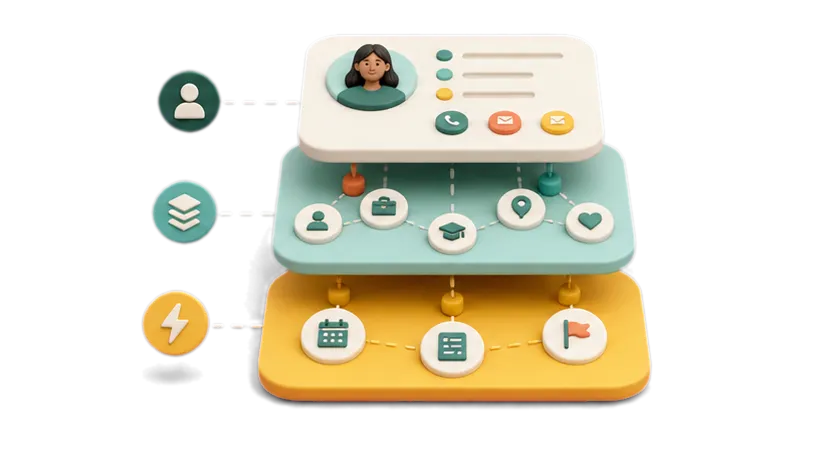
At the most basic level, contact management software holds names, numbers, emails, and any notes you attach to a person. This is the floor, not the ceiling, of what these tools do.
Keeping It Current
Job titles change. Companies get acquired. People move. Good contact management software updates this automatically by syncing with LinkedIn, email, and calendar data, instead of leaving you to notice and fix it manually.
Reminding You to Act
The best tools do not just store what you already know. They tell you when it is time to follow up, and increasingly, they point out relationships worth acting on that you had not thought about recently.
Types of Contact Management Software
Spreadsheets and Native Address Books
Free, familiar, and fine for a small number of contacts. The tradeoff shows up as your network grows: nothing updates itself, and nothing reminds you of anything.
Sales CRMs Repurposed for Contacts
Tools like Salesforce or HubSpot can technically store contacts, but they are built around deals and pipelines. Using one just to manage personal or professional relationships means paying for, and navigating, a lot of features you will never touch.
Personal CRMs Built for Individuals
Tools such as Dex, Folk, and Clay fall here. They are built specifically for individuals managing a personal or professional network, with a much simpler interface than a sales CRM and a stronger focus on reminders and context. We compare these directly in our post on the best personal CRM apps.
Team Contact Tools
Some tools, Folk among them, are built so several people can share visibility into the same contacts. This matters for small sales teams or agencies where more than one person touches the same relationships, less so for an individual managing their own network.
Network Relationship Management: A Newer Category
Network Relationship Management, or NRM, is built around a different question than the categories above. Instead of asking how well your contacts are organized, it asks what your network can actually do for you right now, and surfaces the opportunities and connections you would otherwise miss. Weaverly is built specifically around this category.
How to Evaluate Contact Management Software
Who It's Actually Built For
A tool built for sales teams will feel heavy for an individual. A tool built for individuals may lack the shared visibility a team needs. Start with who the tool was actually designed for, not just its feature list.
How Much Manual Work It Removes
If you are still typing in job titles and company changes by hand, the software is not doing much beyond what a spreadsheet already does.
Whether It Helps You Act, Not Just Store
Storage without direction just becomes a bigger, better organized pile of contacts. The tools worth paying for tell you what to do with what you have stored.
A Quick Look at the Top Tools in 2026
Dex leans into reminders and follow through. Folk is built for small teams sharing contacts. Clay, now largely operating as Mesh, focuses on automatic enrichment and a polished interface. We go through the strengths and limits of each in detail in our full comparison, The Best Personal CRM Apps in 2026.
Where Weaverly Fits
Weaverly is not trying to out organize the tools above. It exists because organizing your contacts well is only half the problem. The other half is knowing what to do with them: who to reach out to this week, why it matters now, and which two people in your network should actually meet. That is what Network Relationship Management is built to solve, and it is the problem Weaverly was built around from the start.
Frequently Asked Questions
What is contact management software?
Contact management software is any tool used to store, organize, and act on information about the people in your professional or personal network, ranging from simple address books to more advanced relationship intelligence platforms.
What's the difference between contact management software and a CRM?
The terms overlap. CRM, or customer relationship management, traditionally refers to sales focused tools built around deals and pipelines. Contact management software is the broader term, covering CRMs as well as personal and team focused tools not built around sales.
Do I need contact management software if I already use a spreadsheet?
A spreadsheet works fine for a small, stable network. It becomes harder to maintain as your contacts grow or change frequently, which is usually the point where dedicated software starts to pay for itself.
Is contact management software the same as a personal CRM?
A personal CRM is one type of contact management software, built specifically for individuals rather than sales teams. Not all contact management software is a personal CRM.
What is Network Relationship Management, or NRM?
NRM is a category of software built around surfacing opportunities inside your existing network, rather than just organizing your contact list. It goes a step beyond traditional contact management or personal CRM tools.
How much should I expect to pay for contact management software?
Pricing varies widely by category and provider, and changes frequently, so it is worth checking each tool's current pricing page directly rather than relying on older figures.
Can contact management software help me find new opportunities, not just store contacts?
Some can. This is the specific gap that Network Relationship Management platforms like Weaverly are built to close, beyond what traditional contact management tools offer.
What's the best contact management software for someone with a small network?
A simple spreadsheet or a lightweight personal CRM is usually enough for a small, stable network. More advanced tools earn their cost as your network and the complexity of maintaining it grow.
Is contact management software worth it if I already use LinkedIn well?
LinkedIn is a directory, not a system for reminders or private notes. Contact management software adds the layer LinkedIn does not provide on its own.
How do I switch from a spreadsheet to contact management software without losing data?
Most contact management tools support importing directly from a CSV file or spreadsheet, along with syncing from email and LinkedIn, so your existing data carries over rather than needing to be re-entered by hand.
Related reading
- The Best Personal CRM Apps in 2026: An Honest Comparison
- Why You Need a CRM for Your Personal Life (And What to Use)
- How to Activate Your Professional Network (Before It Goes Cold)
- What is Network Relationship Management? A new way to activate the contacts you already have.